
Please wait…
You are being securely transferred to our partner site.
seconds remaining
If you are not redirected automatically, click here to proceed.
You type a website name like google.com, press enter, and within seconds it opens. It feels instant—but behind that simple action is a complex system working silently in the background.
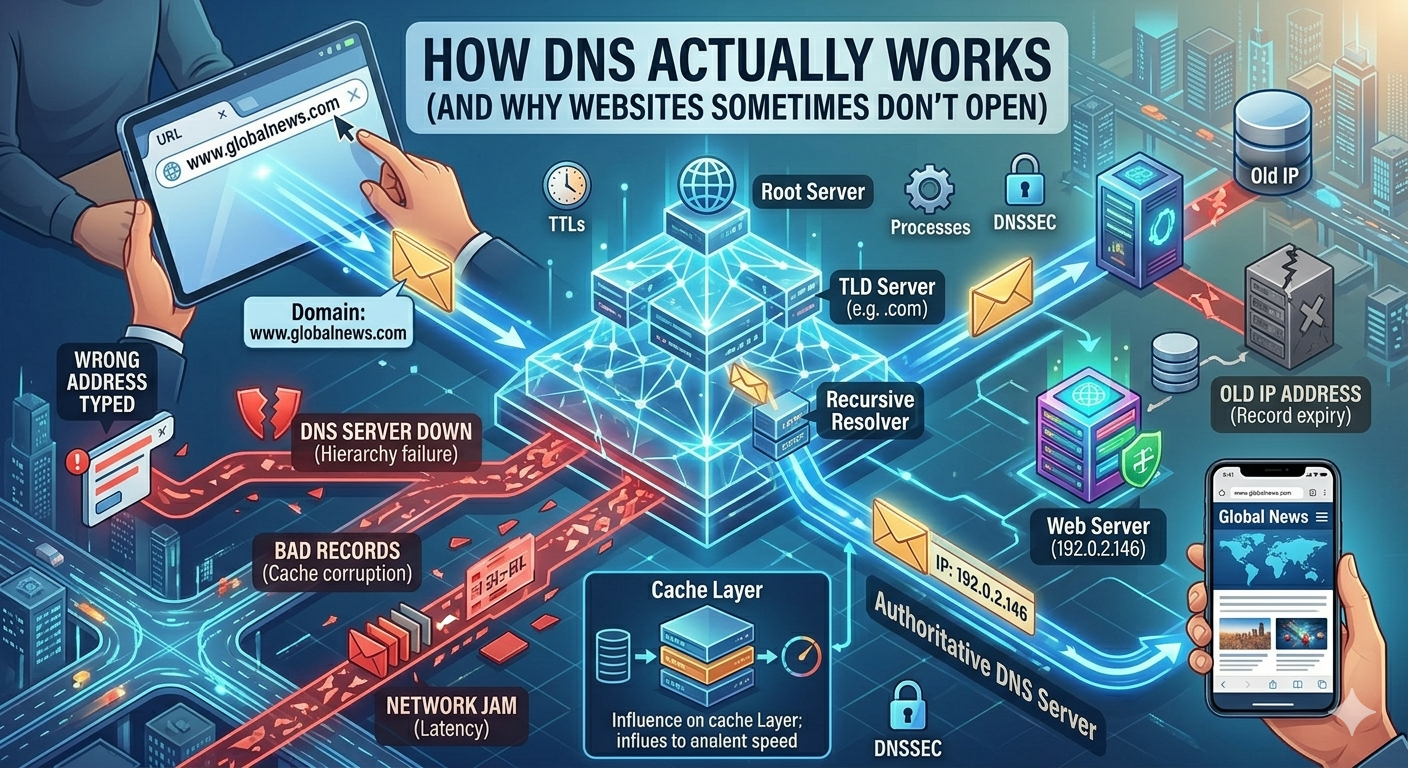
That system is called DNS (Domain Name System).
When DNS fails or slows down, websites suddenly stop opening—even if your internet is working fine. That’s why sometimes you see:
- “This site can’t be reached”
- “Server not found”
- Or endless loading
In this blog, we’ll break down how DNS actually works in simple terms and why websites sometimes don’t open.
What is DNS? (Simple Explanation)
DNS stands for Domain Name System.
👉 Think of it like the phonebook of the internet.
Because:
- Websites have names (like google.com)
- But computers understand numbers (IP addresses like 142.250.190.78)
So DNS converts:
google.com→142.250.190.78
Without DNS, you would have to remember long numbers instead of website names.
How DNS Works Step by Step
Let’s understand what happens when you open a website.
Step 1: You type a website
You enter something like:
facebook.com
Step 2: Your device checks cache
Your phone or computer first checks:
- “Have I visited this site recently?”
If yes → it uses saved data
If no → it moves to DNS lookup
Step 3: Request goes to DNS Resolver
Your request goes to a DNS resolver provided by your internet service provider or public DNS.
Examples:
- Google Public DNS
- ISP DNS servers
This resolver’s job is to find the correct IP address.
Step 4: Resolver asks root DNS servers
If it doesn’t know the answer, it asks:
- Root DNS servers
- Then Top-Level Domain (TLD) servers (.com, .org, etc.)
Step 5: Final IP is returned
Eventually, the resolver finds the correct IP address and sends it back to your device.
Step 6: Website loads
Your browser connects to the IP address and loads the website.
👉 All of this happens in milliseconds.
Why DNS is So Important
Without DNS:
- You would need to memorize IP addresses
- Websites would be hard to access
- The internet would be unusable for normal users
👉 DNS is what makes the internet “user-friendly”.
Why Websites Sometimes Don’t Open (DNS Problems)
Now let’s understand the real issue most people face.
When a website doesn’t open, people think:
- Internet is down
- Phone is broken
- Wi-Fi is weak
But often the real problem is DNS.
1. DNS Server Not Responding
Sometimes your ISP’s DNS fails.
Result:
- Website loads forever
- Error message appears
👉 This is one of the most common issues.
2. Slow DNS Resolution
If DNS servers are slow:
- Websites take longer to open
- Pages feel laggy
This is common during:
- Peak internet hours
- Poor ISP performance
3. Cached DNS Errors
Your device stores old DNS records.
If the website IP changes:
- Your system still tries old address
- Website won’t open
4. Website Server Issues (Not DNS Fault)
Sometimes DNS works fine, but:
- Website itself is down
- Server is overloaded
👉 In this case, DNS is innocent.
5. Blocked or Restricted DNS
In some regions, DNS may block websites due to:
- Government restrictions
- ISP filtering
This can prevent access even if internet is working.
6. Wrong DNS Settings
If DNS is manually changed incorrectly:
- Internet works but websites don’t open
- Random loading errors appear
7. Malware or Network Interference
Some malicious software can:
- Change DNS settings
- Redirect websites
- Block access
Real Example (Simple Understanding)
Imagine:
- You want to call a friend
- But you don’t know their number
- You ask a phonebook service (DNS)
If:
- Phonebook is slow → delay
- Phonebook is broken → no connection
- Wrong number → wrong person
That’s exactly how DNS behaves.
How to Fix DNS Problems (Simple Solutions)
1. Restart your internet
Basic but effective.
2. Change DNS settings
Use reliable DNS like:
- Google DNS
- Cloudflare DNS
These are faster and more stable.
3. Clear DNS cache
This removes outdated records.
4. Switch networks
Try:
- Mobile data
- Different Wi-Fi
5. Check website status
Sometimes the problem is not yours.
How DNS Affects Internet Speed
DNS doesn’t increase your download speed—but it affects:
- How fast websites start loading
- How quickly connections are made
👉 Faster DNS = faster website response time
Why DNS is a Hidden Internet Hero
Even though users rarely notice it, DNS is:
- One of the most critical internet systems
- Responsible for connecting billions of requests daily
- A key part of global internet infrastructure
Without DNS, the modern internet simply wouldn’t exist.
Key Takeaways
- DNS converts website names into IP addresses
- It works like the internet’s phonebook
- Most website issues are caused by DNS problems
- Slow or broken DNS can stop websites from loading
- Changing DNS often fixes many internet issues
Final Thought
Every time you open a website instantly, DNS is working silently in the background.
👉 It’s one of those systems you never see—but depend on every single day.
So the next time a website doesn’t open, remember:
It might not be your internet—it might be DNS doing its job… or failing at it.










Leave a Reply